Stenodisc

Stenodisc lets you approve what your AI agents do and keeps one record of their decisions, whichever assistant made them.

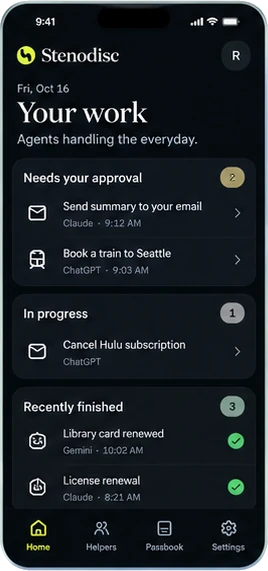
Stenodisc Home screen titled Your work. Under Needs your approval: Send summary to your email from Claude and Book a train to Seattle from ChatGPT. Under In progress: Cancel Hulu subscription from ChatGPT. Under Recently finished: Library card renewed from Gemini and License renewal from Claude, both checked.
Home shows what needs your approval, what your agents are working on, and what they finished.

How an approval works

Claude wants to email you a summary of this week's activity.

  1. Claude asks first

    The request shows the address, the subject, the send time, and what Claude will do. You decline it or approve it.
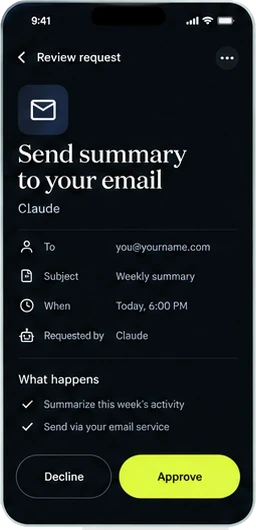
    Review request screen for Send summary to your email, requested by Claude: to you@yourname.com, subject Weekly summary, today at 6:00 PM. What happens: summarize this week's activity, then send it through your email service. Decline and Approve buttons.
    Review request
  2. You approve, and Claude goes ahead

    Stenodisc tracks the request from there. The email service has accepted it, and delivery stays unconfirmed until the service reports it.
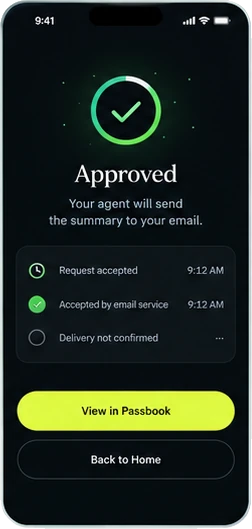
    Approved screen: your agent will send the summary to your email. Request accepted at 9:12 AM, accepted by email service at 9:12 AM, delivery not confirmed. Buttons for View in Passbook and Back to Home.
    Approved
  3. The Passbook keeps every step

    The entry records when Claude asked, when you authorized it, and when the email service accepted it, along with the address, subject, and send time.
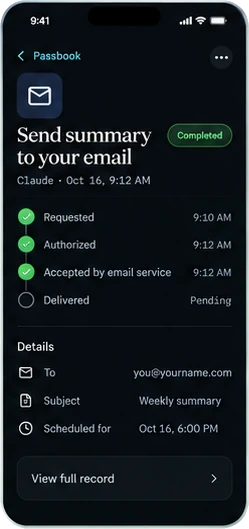
    Passbook entry for Send summary to your email from Claude, October 16 at 9:12 AM. Requested 9:10 AM, authorized 9:12 AM, accepted by email service 9:12 AM, delivered pending. Details list the address, the subject Weekly summary, and the scheduled time October 16 at 6:00 PM.
    Passbook detail

What you can check and change

  • One record across Claude, ChatGPT, and Gemini

    The Passbook lists what each agent did for you, newest first, with its status. You can filter it or export it. Over time the receipts add up to each assistant's track record.
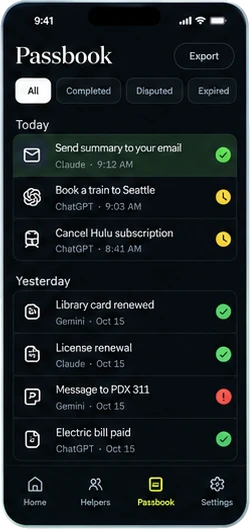
    Passbook screen with filters for All, Completed, Disputed, and Expired and an Export button. Today: Send summary to your email from Claude, done; Book a train to Seattle and Cancel Hulu subscription from ChatGPT, waiting. Yesterday: Library card renewed, License renewal, and Electric bill paid, done, and Message to PDX 311 from Gemini, flagged.
    Passbook
  • Dispute an outcome nobody confirmed

    Stenodisc marks a task done when the service's reply supports it. Claude reported a license renewal as completed, but no renewal was found on file, so the entry is Disputed. You can add evidence or withdraw the dispute, as you would with a card charge.
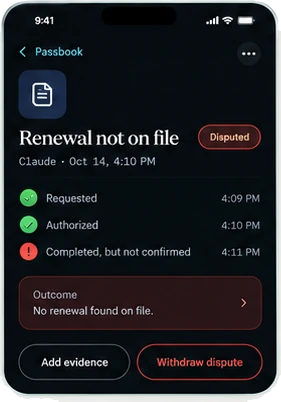
    Passbook entry Renewal not on file from Claude, marked Disputed. Requested 4:09 PM, authorized 4:10 PM, completed but not confirmed 4:11 PM. Outcome: no renewal found on file. Buttons for Add evidence and Withdraw dispute.
    Disputed
  • Set each agent's limits

    Each kind of action runs on its own, asks you first, or stays blocked. Claude handles email, calendar, and files on its own, asks before travel, and is blocked from payments. You can revoke its access from the same screen.
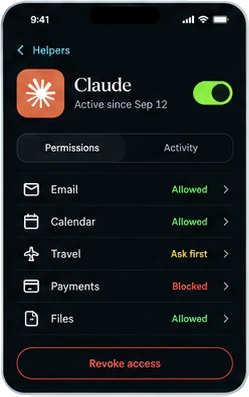
    Permissions for Claude, active since September 12, switched on. Email allowed, Calendar allowed, Travel ask first, Payments blocked, and Files allowed. Revoke access button.
    Helper permissions

Ask for early access

Write to us with the assistants you use and the first errand you'd hand them.

Stenodisc Manager is the side for organizations that receive agents' requests, from reservations to 311 reports. Any organization can opt in by connecting over the Model Context Protocol (MCP) or another agent connection.

Email for early access

Related writing